

New for developers. ChatFX Avatar is a separate product for people who build their own voice agents. If you'd rather have it ready-made, with voice and knowledge training included, ChatFX already has avatars built in.
Voice agents have come a long way. They listen, think and answer in a natural voice, in real time. What most of them still don't have is a face. Today we're launching ChatFX Avatar, a real-time talking avatar that any developer can add to their own AI agent.
You keep the agent you've built: its listening, its AI and its voice. ChatFX Avatar adds a lifelike face that speaks that voice, with the lips in time, right in your agent's LiveKit room. You pay only for the minutes it's on a call.

Built for developers
ChatFX Avatar is made for people who already run a voice agent on LiveKit Cloud. The avatar joins your agent's room as one more participant. Your agent sends its voice to the avatar instead of straight into the room, and the avatar speaks it, shown as your agent.
- LiveKit Agents (Python): a few lines in your agent's entrypoint, with our plugin.
- Any other LiveKit app: three simple calls from your server to start, check in and end.
- Your keys stay yours: your LiveKit key and secret never leave your server, and our API keys are shown once and stored scrambled.
The Deploy page in your dashboard fills in your avatar's id, gives you the code, and walks you through every step to your first call.
Build an avatar in minutes
Every avatar is a person and a place. Pick from ready-made people and backgrounds, or upload your own photos. Drag them onto the stage, choose landscape, square or portrait, then zoom and move each one until the framing is just right. What you see on the stage is exactly what your callers will see.
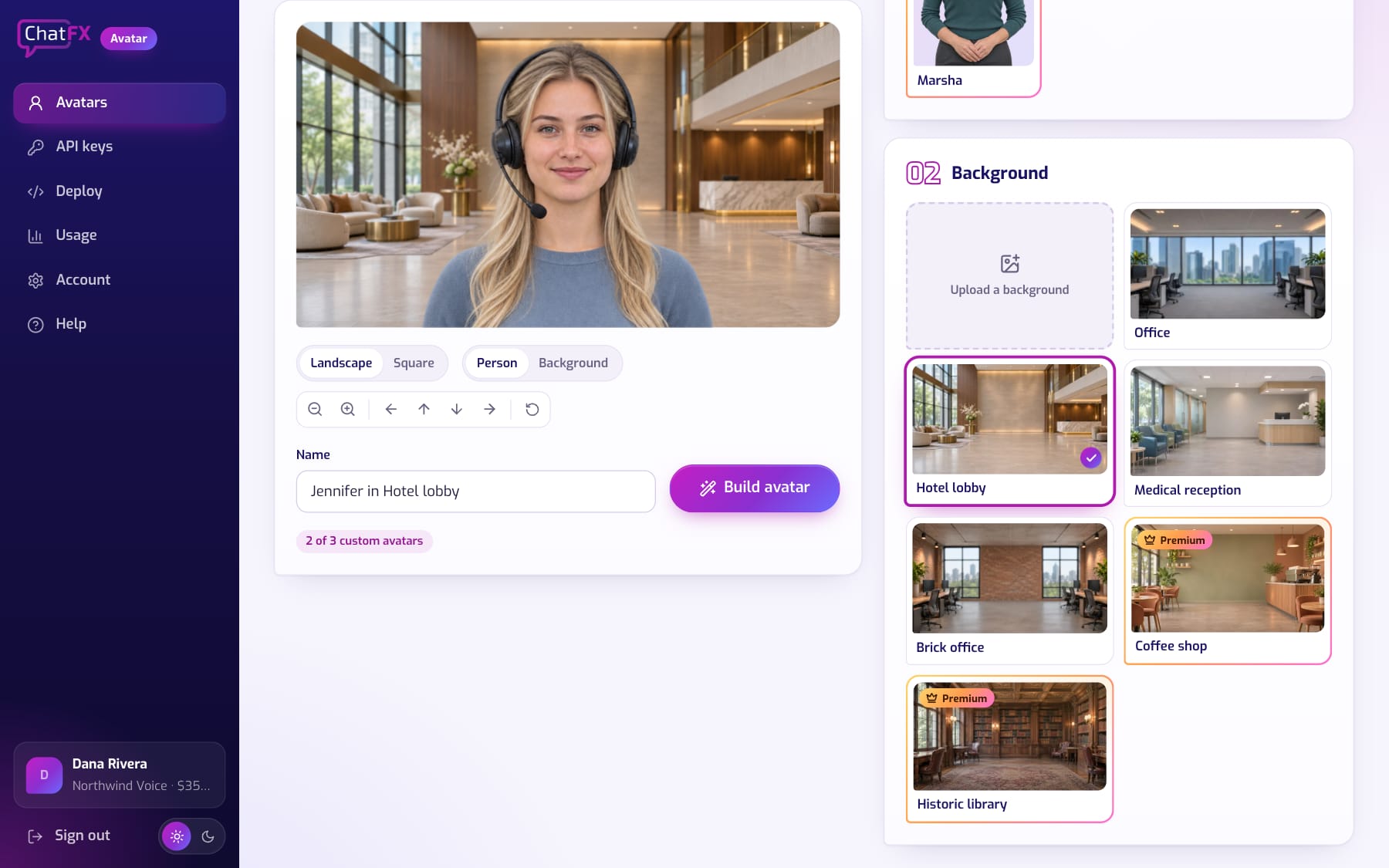
Premium people and backgrounds give your brand a look of its own. And if a photo's framing is a little off, like a head too close to the top, the builder fixes it for you.
Simple pricing, by the minute
Every account starts free with 10 minutes and one custom avatar. After that, plans are $10 a month for 60 minutes, $35 for 300 and $100 for 1,000, and you can keep going past your minutes when you need to. Minutes count only while the avatar is in a call. See the developer plans for the details.
Want it ready-made? Take a look at ChatFX
ChatFX Avatar is a building block for developers. If you run a business and want great service without writing code, ChatFX is the better fit. It answers your website chats and phone calls in a natural voice, learns your business from your own website and documents, and brings in your team when a customer needs a person.
And it already includes avatars. Your visitors tap the camera in your chat and talk face to face with an AI avatar that knows your business, with nothing to build. See avatars in ChatFX.
Get started
Sign up at avatar.chatfx.com for your 10 free minutes, then follow Getting started with ChatFX Avatar from sign-up to your agent's first call with a face. Questions? Email service@chatfx.com and a person will reply.
Frequently asked questions
How do I add ChatFX Avatar to a LiveKit voice agent?
For LiveKit Agents in Python, add a few lines to your agent’s entrypoint using our plugin. For another LiveKit app, make three calls from your server to start, check in and end the avatar session. The Deploy page provides your avatar ID, code and setup steps.
Can I use my own photos for a ChatFX avatar?
Yes. You can upload photos for the person and background, or choose from ready-made options. In the builder, you can select landscape, square or portrait, then move and zoom the images. The stage shows what callers will see.
Does ChatFX Avatar store my LiveKit credentials?
No. Your LiveKit key and secret stay on your server. ChatFX Avatar API keys are shown once and stored scrambled.
Can I use a ChatFX avatar without building a voice agent?
Yes. ChatFX includes avatars for businesses that want a ready-made option without writing code. Visitors can tap the camera in your website chat to talk face to face with an AI avatar. You can train it on your business using your website and documents.
Can a customer talk to a person instead of a ChatFX avatar?
Yes. In ChatFX, your own team can take over when a customer needs a person. Team members who switch to Available receive those conversations. If nobody is free, the AI keeps helping and takes the customer’s details for a follow-up.
How much does ChatFX Avatar cost?
Every account starts with 10 free minutes and one custom avatar. Paid plans are $10 a month for 60 minutes, $35 for 300 minutes, or $100 for 1,000 minutes. You can continue past your included minutes, and minutes count only while the avatar is in a call.


